
Most SharePoint site structures were not planned. They grew organically over time, accumulating more and more. We redesign the structure around how your people actually look for information, test it with them before anything gets built, and hand over an architecture your own team can maintain.
Structure first, navigation second, visual work last. In that order.
What it is
SharePoint information architecture is the structural layer of your SharePoint environment - how sites and hubs are organised, how content is classified with metadata, how navigation is layered and how search behaves. We establish it with card sorting and validate it with tree testing before build.
How long
Three to four weeks for the user experience and information architecture phase, before technical build begins.
What you get
An information architecture document covering navigation, structure and hierarchy, a taxonomy and metadata framework, and validated navigation with the tree testing results behind it.
Who does it
The user experience consultants who scope the work are the ones who run it, from card sorting through to sign-off.
None of these are platform faults. They are all consequences of structure and navigation being decided late, or never.
What we see most often is storage split across OneDrive, communication sites and Teams project sites, with no rule about which is authoritative. When people find conflicting duplicates, or use the wrong information inadvertently, they lose trust in SharePoint and go back to asking a colleague.
Most organisations we engage with are still organising by folder rather than by metadata or content types. It works while one team owns the content and fails the moment two teams need the same document to appear in different contexts.
Labels drawn from internal structure and internal acronyms only work for people who already know the organisation. They are worst for the people who need the intranet most - new joiners, frontline staff, and anyone working across divisions.
In most of the stalled projects we are brought into, a decision about technology was made before anyone established what employees needed. For example, "we're going to use Teams because that's what everyone is using most". The structure then has to be retro-fitted to a platform decision it should have informed.
Sites get created on request rather than by design. Within two years there is no consistent hierarchy, hub associations are arbitrary, and search returns four versions of the same policy.
Reducing the time people spend looking for things is the single most common goal we are given at the start of a project. It is also the one least likely to have a baseline measurement, which makes it impossible to evidence afterwards.
Microsoft documentation will tell you what a hub site is. It will not tell you which hubs your organisation needs. That is a research question, and it is most of the work.
Everyone holds a different mental model of how the same information relates. The point is not to find the correct model, because there is not one. It is to find the model that works for the largest number of people, and to know where the compromises are before they surface as complaints.
We put the topics your organisation actually holds onto individual cards and ask employees to group them. Run across enough people, the patterns show you where consensus genuinely exists and where two departments will never agree, which is exactly the information you need before drawing a hierarchy.
Modern SharePoint works best as a flat architecture - independent sites for distinct areas of the business, connected by hub sites, rather than nested subsites that cannot be reorganised later. On top of that sit three navigation layers, and confusing them is one of the most common structural faults we find.
A folder puts a document in one place. Metadata lets the same document surface correctly for someone browsing by country, someone filtering by document type and someone checking a review date. This is the classification layer the structure depends on, and it is almost always the part that was skipped.
Enterprise search across multiple systems, relevance tuning and expertise discovery sit with our knowledge management and AI and search teams rather than in this phase.
We give people real tasks against the proposed structure, as text only, with no visual design or search to fall back on. If they cannot find things in a text version of your hierarchy, they will not find them in the finished site either. Every failed task tells you which label is wrong, and it costs a fraction of discovering it after launch.
The validated structure becomes functional requirements for the pages that carry the most traffic, signed off before any build begins. Nothing goes into development on the strength of a conversation.
If this describes an environment you already have rather than one you are planning, the starting point is usually an assessment of what is there before any structural work.
Not every SharePoint information architecture project is the same size. Sometimes there is a lot of existing content to repurpose, other times we start afresh. We scale our activities to the appropriate level, and we can also guide internal teams on completing certain work themselves.
The architecture is not useful as a conversation. It has to exist as something a developer can build against and a content owner can apply a year later.
Navigation, structure and hierarchy, typically to five levels, with site and hub relationships defined
Homepage, search and hub pages, produced to the standard set out on the discovery page
Term sets, content types and managed columns, agreed with the people who own the content
What each key page has to do, written so they can go straight into a build backlog
The three navigation layers defined, with the tree testing results showing what was changed and why
Configured against the metadata columns defined above, plus the baseline measures to evidence improvement
Where consensus existed, where it did not, and which compromises were made deliberately
Who owns which part of the structure, and how new sites get created without eroding it
Three to four weeks for the user experience and information architecture phase, ahead of technical build.
Runs in parallel with stakeholder work
Interviews, workshops and card sorting. This is the part organisations are most tempted to compress, and the part where compression costs most later.
Draft, test, revise, re-test
The hierarchy and taxonomy are drafted, then tested as text through tree testing with real employees, and revised before anyone sees a design.
Ends with a signed-off architecture
Page-level layouts and functional requirements, signed off before build. Technical build then typically runs eight to twelve weeks, with two weeks of user acceptance testing.
Senior throughout, not after the pitch
The user experience consultants who scope the work are the ones who run it. A typical team is a UX director, a technical director, developers, a QA manager and a project manager, with the same senior people from research through to launch and support.
Microsoft’s own accessibility conformance report rates SharePoint as partially supporting WCAG 2.1 Level AA, with published exceptions. Not fully supporting. Any supplier telling you the platform is compliant out of the box has not read the report.
There is a second point that matters more for work like this. Microsoft’s conformance statement does not survive customisation. Branding, custom web parts and a bespoke structure all mean the platform’s own claim no longer covers the result, and any conformance statement about your intranet has to be your own.
So we are specific about what we take responsibility for. We do not degrade what the platform already provides, and we control the things this work actually determines: colour contrast in branding, heading hierarchy, descriptive link text rather than “click here”, keyboard navigability of anything custom, and navigation labels that are clear rather than clever.
The largest accessibility risk in any SharePoint environment is not the platform, though. It is what content authors publish into it after launch – missing alt text, tables used for layout, colour used to carry meaning. That is a governance and training problem, and it is part of how we hand over.
Our information architecture practice is led by John Scott. He is named on the proposal, in the card sorting sessions and in the tree testing.

Two things follow from that continuity. The method is settled, so we are not learning card sorting on your project. And having worked on the platform since 2006, we have seen what becomes of an architecture three years after launch – which changes the decisions we make at the start.
We also build and support what we recommend. The structure we hand over has to survive delivery, not just review – and if the right answer is that you do not need structural work yet, we will say so.


Communications Executive
Johnson Matthey
SharePoint was available across the organisation but there was no consistent model for how project, department or programme content should be organised, so search had little to work with. Taxonomy and information architecture workshops with the communications and IT teams established how IDH actually organises its work, and those decisions then shaped the navigation model, the search experience and the templates every new site is built from.
A global distributor network could not find approved marketing assets. The content existed on SharePoint, but it was a flat list of files with no thumbnails and no meaningful taxonomy. Restructuring it into a browsable portal - search built on tags and categories, navigation shaped around products and audiences rather than internal history - brought distributor sign-up requests on day one.
A central hub feeding multiple connected sites, with thousands of pages accumulating over time and no consistent way to flag content that had outlived its usefulness, notify the right owner or force a decision. A four-stage content lifecycle process now identifies expiring pages, prompts owners twice, then restricts access before deletion - governance that holds as the environment keeps growing.
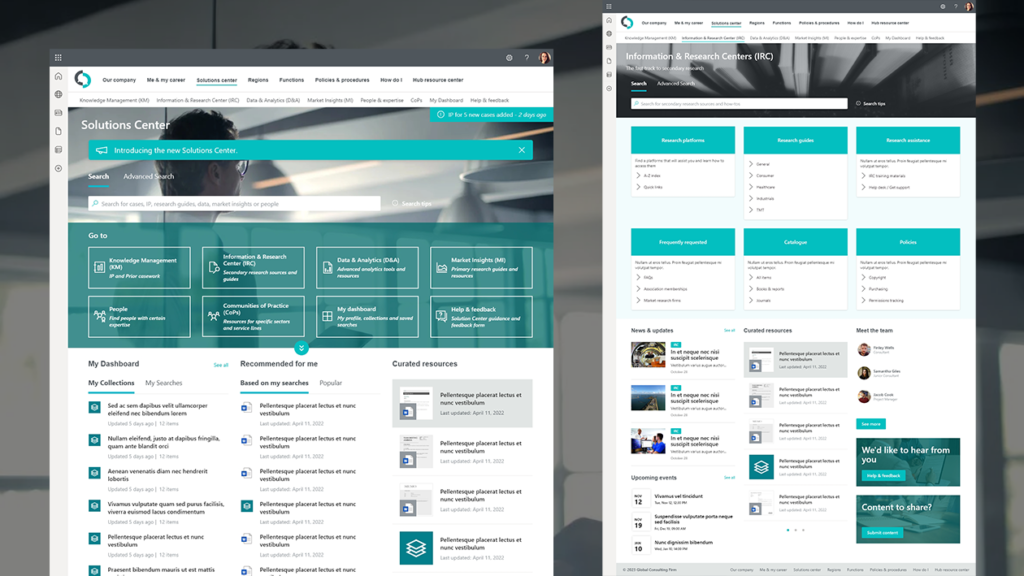
BlogIntranet strategySharePoint Intranet
Explore best practices for using SharePoint in knowledge management (KM) to enhance efficiency and collaboration.
4 September 2026

Blog
Copilot doesn't create content problems, it exposes them. Join Content Formula and Spark Trajectory on 15 September for the content, IA and permissions work to do first.
28 August 2026
Blog
SharePoint comes with almost every Microsoft 365 subscription, but most organisations use a fraction of it. This guide covers what SharePoint actually is, what it's used for, and what changed now Microsoft 365 Copilot reads from it.
21 August 2026
If the environment is live and the problem is not yet clearly defined, an assessment of the current structure, navigation and findability is a smaller starting point than a full engagement – and it sometimes concludes that governance, not structure, is what needs fixing.
Structural mistakes are cheap to fix in week two and expensive to fix after launch. If you are planning a SharePoint project, or living with one that nobody can navigate, the conversation starts with what your people actually need.
SharePoint information architecture is the structural design of a SharePoint environment – how content is organised, classified, navigated and found. It covers site architecture, usually a flat structure of independent sites connected by hub sites rather than nested subsites; lists and libraries; content types and managed metadata; the three navigation layers of global, hub and local; and search configuration. A good architecture is established by card sorting with employees and validated by tree testing before build, because the aim is a structure that matches how the people using it think, not one that matches how the organisation is drawn on a chart.
Yes. Information architecture is one discipline within user experience, alongside user research, interaction design and usability testing. The distinction that matters in practice is that information architecture determines whether something can be found at all, while the rest of UX determines whether it is pleasant to use once found. A SharePoint environment can look excellent and still fail, because the structural work was never done.
Because a folder can only put a document in one place, and most documents need to be found in several ways. Metadata columns let the same file surface correctly for someone searching by country, someone browsing by document type and someone filtering by review date, without duplicating it. Folders also hide content from search refiners, make permissions harder to reason about, and become unusable once the hierarchy goes more than a few levels deep. Folders are not forbidden, and shallow folders inside a well-classified library are fine – but using folders as the primary organising principle is what causes findability to collapse as content grows.
Because a folder can only put a document in one place, and most documents need to be found in several ways. Metadata columns let the same file surface correctly for someone searching by country, someone browsing by document type and someone filtering by review date, without duplicating it. Folders also hide content from search refiners, make permissions harder to reason about, and become unusable once the hierarchy goes more than a few levels deep. Folders are not forbidden, and shallow folders inside a well-classified library are fine – but using folders as the primary organising principle is what causes findability to collapse as content grows.
Three to four weeks for the user experience and information architecture phase, before technical build begins. That covers user research, card sorting, drafting the structure and taxonomy, tree testing it with employees, and producing wireframes and user stories for sign-off. Technical build then typically runs eight to twelve weeks with two weeks of user acceptance testing. Where you already hold solid user research, the phase can be shortened to knowledge transfer and recommendations rather than repeating work you have paid for once.
We use cookies to enhance your experience. You can accept, reject, or customise your choices. Learn more via our links below.