
An out of the box SharePoint intranet is one built entirely on native SharePoint Online, with no additional product and no custom code. We deliver them three ways: a new build, a restructure of one that has sprawled, or a redesign of the intranet you already have.
A design or restructure piece runs in weeks. A full build is typically six to ten.
What we do
Build, restructure and redesign intranets on native SharePoint Online - site and hub architecture, page design and layouts, targeted news, policy libraries and department areas.
Where we start
With what you already have. A new build starts with discovery and structure. An improvement starts with reviewing what is there and what is not working.
What you own after
Standard SharePoint your own team can run. No licence to renew, no vendor dependency, no upgrade path to manage.
How long
Two to four weeks for a design or restructure piece, six to ten for a full build. Quoted against an agreed scope.
Not everyone needs a new intranet. Most of this work is improving one that already exists.
“We need an intranet and we are not buying a product”
A full native build. Common where a no-customisation policy is in place - financial services, public sector, healthcare - or where the requirements are genuinely contained and a product layer would mean paying for features nobody turns on.
“Ours works, but it looks like SharePoint”
Our SharePoint design services, applied to what you already have. New homepage and landing page designs, consistent section patterns, hero treatments, and the brand centre set up properly. No rebuild, no migration, and a fraction of the cost of one.
“Nobody can find anything any more”
Sites have sprawled, ownership is unclear and search has filled with noise. The fix is a restructure - information architecture, navigation, metadata and permissions - rather than a new platform. Usually a few weeks of work.
“We need to know whether to buy anything”
An honest read on whether native SharePoint covers your requirements. If it does, that is a shorter and cheaper project. If it does not, you will know which gaps are driving the decision before you go to procurement.
Most SharePoint partners are technical houses that treat design as theming at the end of a build. We have a dedicated user experience team, and design runs alongside the structure work rather than after it.
It is the most common reason organisations pick us over another Microsoft partner, and it is why a native build from us does not have to look like a native build.
Settling the structure before configuring anything is best practice, and on a new build it is where we start. On a homepage redesign or a set of landing page layouts it would be overkill, and we will tell you that rather than sell it.
Where the scope warrants it, this runs as a digital workplace discovery in its own right.
We use what SharePoint already gives you before reaching for anything else. If a requirement can be met with audience targeting and a hub structure, that is the recommendation, even where it is a smaller piece of work for us.
There are things SharePoint does not do, and we name them upfront rather than three months in. If your requirements need more, we will say so before you have spent the budget.
Because there is no custom code and no product layer, the people who own the intranet can maintain it. Training and a governance model are part of the build, not an upsell afterwards.
More than most teams realise, and the gap is usually in how it is set up rather than what it can do.
Communication sites for publishing, hub sites to connect them under shared navigation and branding, and a structure that scales without the deep subsite trees that made older intranets unmanageable.
News posts targeted to Entra ID groups, plus Hero, Quick Links, People, Events, Highlighted Content and the rest of the native set. Enough to build every page type a contained intranet needs.
Microsoft Search across SharePoint, OneDrive and Teams, the intranet surfaced inside Teams through Viva Connections, and responsive pages plus the mobile app. All included, all dependent on your content being in order.
Entra ID single sign-on, conditional access and Purview labelling from E3 up. AI in SharePoint adds assisted page creation and summarisation, and site agents can answer from your content - both licence-dependent.
Getting the most out of this set is a configuration and structure question rather than a licensing one. See SharePoint consulting services.
The three things that decide whether a native build succeeds. None of them are features.
Most out of the box intranets that fail did not fail because SharePoint was missing a web part. They failed because nobody decided how information should be structured, who owns which content, or what happens to a page nine months after it is published. That work is the same whether or not you buy a product on top, and it is the part we are actually hired for.
Microsoft Search is genuinely good, but it surfaces what your structure and metadata tell it to. Without a considered architecture it returns noise, and employees go back to asking a colleague instead.
Where the scope warrants it we run card sorting and tree testing with real employees, so the navigation reflects how people actually look for things rather than how the organisation chart is drawn. It is also the evidence base if you ever need to justify further investment. On smaller pieces it is a lighter review of what is already there. See SharePoint information architecture.
Native SharePoint has no built-in way to flag stale pages, enforce ownership or track review dates at scale. Left alone, an intranet fills with content nobody has looked at since launch and trust drains away.
A native build handles this with process rather than product: named content owners, a review cadence, a publishing model, and a retirement rule agreed before go-live. It takes discipline, and it works.
Where the burden is specifically policies and procedures - controlled documents that need version control, mandatory reads and audit evidence - that is a different problem with a different answer. Policy management software handles it inside the same tenant.
The gap between having a SharePoint licence and having a working intranet is usually a knowledge gap. The people who own the intranet are typically communicators and HR teams, not SharePoint specialists.
Training, a content author community and a clear support route are part of how we deliver, alongside user adoption and change management where the change is significant.
Often the answer is a restructure rather than a rebuild. That conversation starts with discovery.
A full build is made up of 6 key stages. A restructure or a design piece uses two or three of them. No packages or tiers – one scope, shaped around where you are starting from.
Stakeholder and user research to establish what the intranet has to do. Where the scope is larger this runs as a full discovery engagement.
Card sorting and tree testing, then the site and hub structure, navigation model and metadata that everything else depends on.
What moves, what gets rewritten and what gets retired. Most intranet migrations are an opportunity to delete, and we treat them that way.
Sites, pages, web parts, audience targeting, permissions and the Teams integration - configured to best practice, with no code written.
Site owners and content authors trained on the platform they will run, with the governance framework documented and agreed.
Launch support, then optional SharePoint support services if you would rather not carry it in-house.
Take the whole set on a new build, or any part of it on an intranet you already have. Every element uses native SharePoint capability only.
A homepage news feed, plus search and an archive. Contributors submit, editors approve before anything publishes, and posts are targeted to the audiences that need them.
A shop window page for each function, pointing employees at the information and people they need, all connected under the hub navigation.
A structured document library with metadata and permissions, so compliance content is findable rather than buried three folders deep.
Vision, strategy, values and the organisational story, built as designed pages rather than uploaded PDFs nobody opens.
A central events calendar surfaced across sites and filterable by type, plus a Viva Engage feed bringing the employee voice onto the homepage.
The intranet surfaced inside Teams through Viva Connections, so it reaches people in the flow of work and on the Teams mobile app.
Homepage and landing page designs, repeatable section patterns, hero treatments and the brand centre configured so every site stays consistent. Intranet design on modern SharePoint is the most common standalone piece of work we do on an existing intranet, and it needs no rebuild and no migration.
Hub architecture, menu design, taxonomy and permissions on modern SharePoint. Either as the foundation of a new build, or as a restructure of an estate that has grown without one. Where the piece is substantial it runs as dedicated SharePoint information architecture work.
The assumption that out of the box has to look like SharePoint is the single most common reason teams conclude they need to buy a product. It is also wrong.
Native SharePoint gives you more design control than most teams ever use, and almost none of it requires code. What separates a native intranet that looks considered from one that looks like a default site is not the platform – it is whether anyone designed it. Our user experience team does that work on every build, and as a standalone piece on intranets that already exist.
Your palette, logo and fonts applied consistently across every site in the estate, controlled centrally so a new site inherits the look rather than reinventing it. Considerably further than the default theme picker gets you.
The pages that carry the intranet. Hero treatments, news presentation, quick link grouping and section rhythm, designed as a layout rather than assembled web part by web part until the page is full.
A set of templates for the page types you publish repeatedly - department landing pages, news posts, campaign pages, policy areas. Authors get a starting point that already looks right, which is how a design survives contact with a decentralised publishing model.
An icon set, image treatment and a library of section patterns authors can reuse. The unglamorous part, and the reason intranets still look coherent two years after launch rather than drifting page by page.
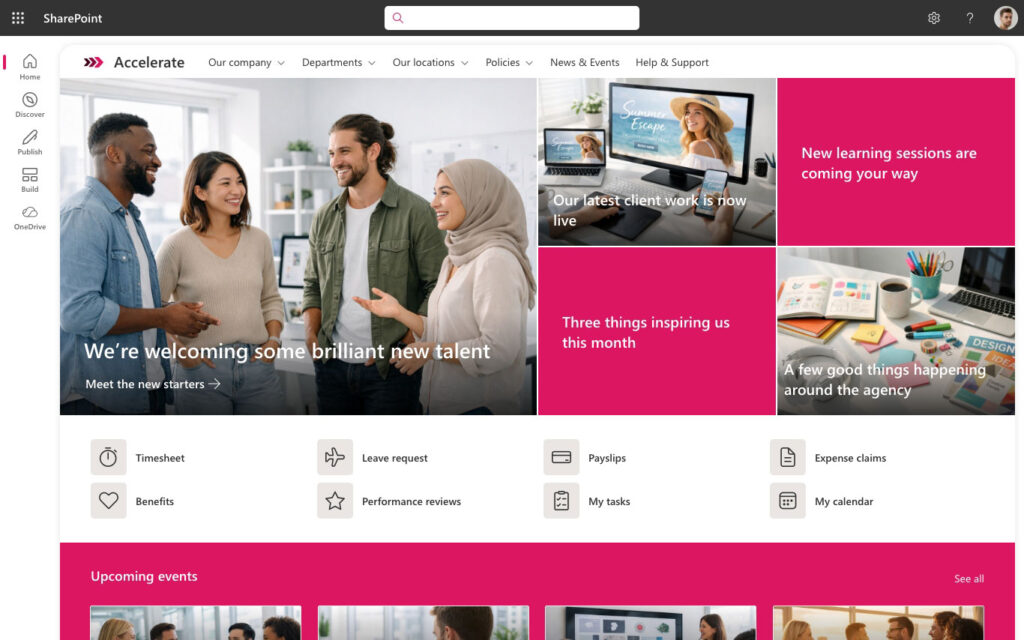
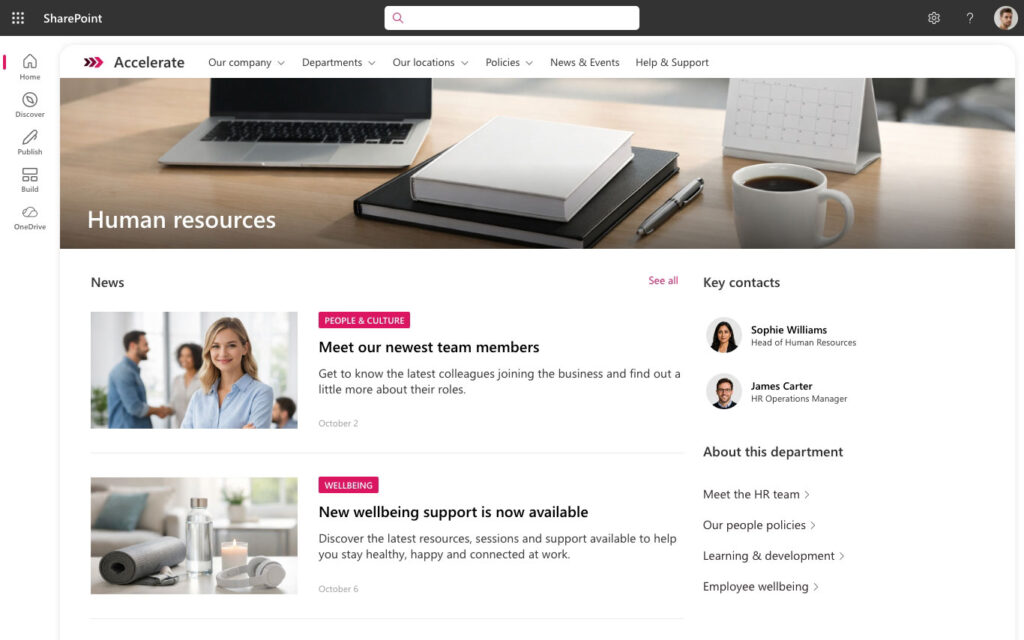
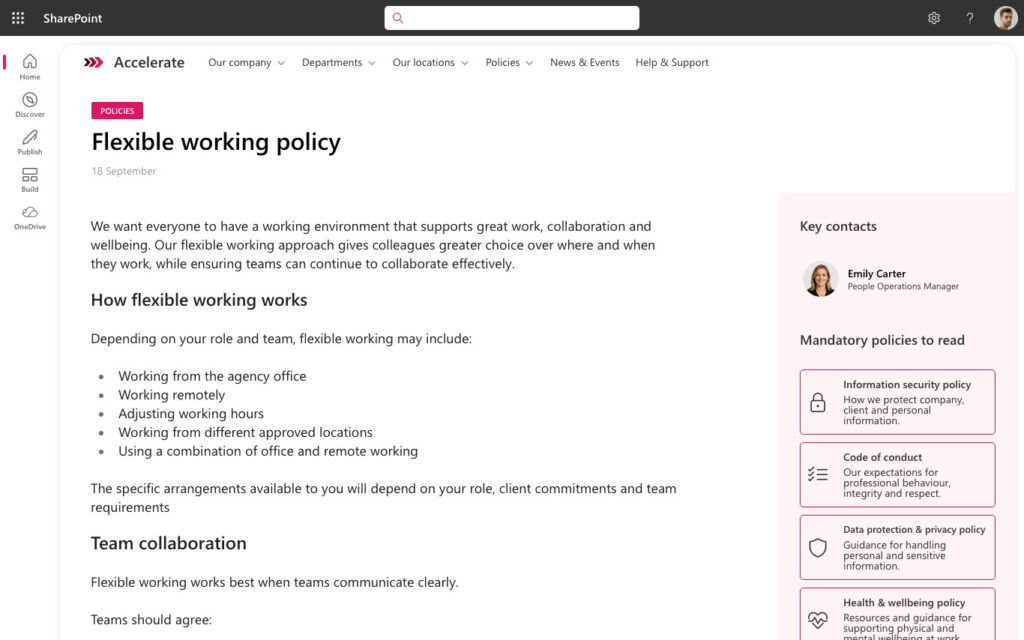
A facelift on the intranet you already run – new homepage and landing page designs, a set of reusable page templates, and the brand centre set up properly. Content stays where it is, permissions are untouched, nothing migrates. Two to four weeks, and the cheapest change you can make to how an intranet feels.
If your requirements sit in the right-hand column, we will tell you early and point you somewhere better.
On the last four
Most teams can live without these on day one. If two or three are genuinely non-negotiable, say so at discovery – it changes the recommendation, and it is a cheaper conversation to have now.
If native covers almost everything and one requirement does not fit - an integration with a line-of-business system, a specific dashboard, a web part that does not exist - that is a contained piece of work, not a reason to buy a platform.
We build these as SPFx web parts or Power Platform solutions inside your own tenant. See SharePoint development services.
If you need mandatory reads, personalisation, proper intranet analytics and full brand control, you are describing an in-a-box product rather than a native build. Buying one closes those gaps in weeks without custom development.
We built Lightspeed365 for exactly this, and it runs inside your tenant with no external hosting. We will only recommend it where the requirements warrant it - if native does the job, native is the answer.

My consulting firm hired Content Formula to advise us on a better approach to information management and redesign our SharePoint site to support the new approach. We had an exceptional experience, and came away very pleased with both how the project went and its results.
Consulting firm


Head Of Customer Experience
Societe Generale Equipment Finance
Tell us what is not working – whether that is a dated homepage, a structure nobody can navigate, or no intranet at all – and we will tell you whether native SharePoint can fix it. If it can, that is a shorter and cheaper project than buying anything, and we would rather have that conversation now than in three months’ time.
An out of the box SharePoint intranet is a company intranet built entirely on native SharePoint Online, using only the site types, web parts and features included in your Microsoft 365 subscription. No third-party intranet product is added and no custom code is written. It is sometimes called a native SharePoint intranet or a SharePoint intranet without customisation. The platform cost is nil because SharePoint is already licensed – the investment is in design, structure, content and configuration.
Yes. SharePoint Online includes communication sites, hub sites, over 50 native web parts, Microsoft Search, audience targeting and Teams delivery through Viva Connections. For organisations with contained requirements this is enough to launch a genuinely good intranet. What it does not include is personalisation, mandatory reads, content lifecycle tracking or intranet-level analytics, so the honest answer depends on whether those sit on your must-have list.
There is no software cost, because SharePoint Online is already part of your Microsoft 365 subscription. The cost is the delivery work: discovery, information architecture, content planning and migration, configuration, training and launch. We quote against an agreed scope rather than a tier, because the variable is almost always the volume of content being migrated and the number of stakeholder groups involved.
Six to ten weeks for a single-tenant build is typical, from kick-off to launch. Discovery and information architecture take roughly the first third of that. Content is almost always the thing that extends a timeline, so we agree what is migrating, what is being rewritten and what is being retired before configuration starts.
Out of the box means native SharePoint with no additional software – you configure what Microsoft already gives you. An in-a-box product adds web parts and features on top of SharePoint to close known gaps, typically in branding, personalisation, news management, governance and analytics. Native has no licence cost and nothing to maintain. A product costs more but closes those gaps immediately. Which is right depends on your requirements, not on which is cheaper.
Yes, and the content work matters more than the platform choice. Copilot retrieves and reasons over what sits in SharePoint, so a well-structured intranet with current content and correct permissions produces better answers than a heavily featured one full of stale pages. AI in SharePoint and site agents both work on a native build. Note that the fuller Copilot experience requires a per-user Microsoft 365 Copilot licence on top of your base plan.
Usually, yes, and it is the more common request. If the platform is sound but the intranet looks dated, that is a design and layout piece – new homepage and landing page designs, consistent section patterns and the brand centre set up properly. If people cannot find things, that is a restructure of the information architecture, navigation and metadata. Both run in weeks rather than months, and neither requires a migration. We would only recommend a rebuild where the underlying structure cannot be salvaged.
Yes. Because everything is standard SharePoint, nothing has to be unpicked. You can add individual custom web parts through SharePoint development services, or layer an in-a-box product such as Lightspeed365 over the same structure. The information architecture, content and governance you put in place carry over either way, which is why we recommend getting those right first.
Yes. SharePoint intranet design work – new homepage and landing page layouts, consistent section patterns, hero treatments and brand centre configuration – applies to the sites you already have. Content stays where it is, permissions are untouched and there is no migration. This is typically a two to four week engagement and it is the fastest way to change how an intranet feels without changing what it runs on.
Your own team, in most cases. There is no custom code and no product layer, so site owners and content authors can run it with the training and governance framework we put in place. Where you would rather not carry it internally, our SharePoint support services cover ongoing platform management.
We use cookies to enhance your experience. You can accept, reject, or customise your choices. Learn more via our links below.